Getting Started
Prerequisites, architecture overview, and fresh cluster bootstrap.
This section covers what you need before running the homelab, how the four layers fit together, and the commands to bootstrap a fresh cluster.
Architecture Overview
The homelab is organized in four layers. Each layer is managed by a specific tool:
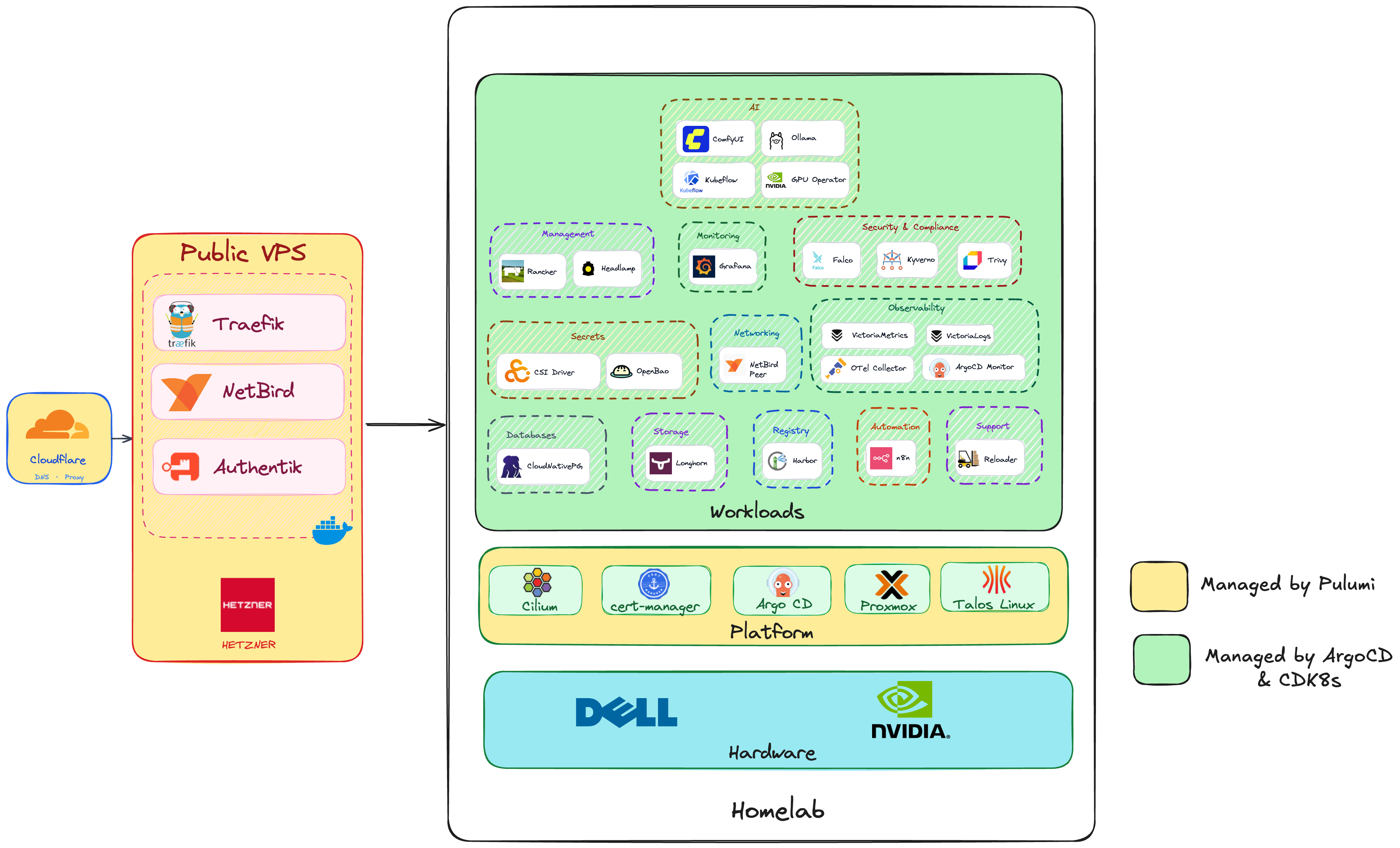
| Layer | What's in it | Managed by |
|---|---|---|
| Apps | ComfyUI, Ollama, Grafana, Harbor, n8n, Falco, … | Argo CD + CDK8s |
| Platform | Talos K8s, Cilium CNI, Gateway API, Argo CD, cert-manager | Pulumi |
| Infrastructure | Proxmox VMs (7 nodes), Hetzner VPS (Bifrost edge) | Pulumi |
| Hardware | Proxmox host, NVIDIA RTX 5070 Ti | Manual |
Prerequisites
All tools are available inside the devcontainer;
to install them by hand: pulumi, talosctl, kubectl, just, sops, age,
cdk8s (npm i -g cdk8s-cli) and Go — the toolchain version is pinned in
.mise.toml and the devcontainer image.
The Proxmox host needs headroom for 7 VMs (32 vCPU, 82 GiB, 1000 GiB disk),
API access for the Pulumi provider, and an NVIDIA GPU to pass through to
k8s-worker4.
Before any Pulumi command, set up the SOPS age key and populate the secrets file — that procedure and the full secrets list are in the Deployment Guide, which also walks the whole build from bare Proxmox to a synced cluster.
The repository layout is mapped in CDK8s.
Justfile Recipes
Provisioning
| Command | What it does |
|---|---|
just create-secrets | Create bootstrap k8s Secrets from SOPS |
just core talos up | Provision Proxmox VMs and bootstrap Talos |
just core platform up | Install Cilium, Gateway API, cert-manager, and Argo CD |
just core hetzner up | Deploy Bifrost VPS + automated bootstrap |
just core authentik up | Create OIDC apps + ForwardAuth in Authentik |
just core cloudflare up | Create/update DNS records |
just synth | Synthesize CDK8s manifests → app/ |
just build-push <image> <tag> | Build a custom image and push it to Harbor |
Secrets
| Command | What it does |
|---|---|
just openbao-init | One-time OpenBao initialization |
just openbao-setup | Configure K8s auth, policies, and roles |
just openbao-token | Mint a temporary root token |
just openbao-get <path> [field] | Read a secret with the root token |
just openbao-revoke <token> | Revoke a root token when finished |
just openbao-sa-token <sa> <ns> <role> | Mint a token as an app's ServiceAccount |
just openbao-sa-get <sa> <ns> <role> <path> [field] | Read a secret as that app — checks a policy actually works |
just sops-view <file> | Open a SOPS file in $EDITOR |
just sops-decrypt <file> | Decrypt a SOPS file to stdout |
Operations
| Command | What it does |
|---|---|
just talos-health | Cluster health — must be clean before upgrading a node |
just talos-versions | Talos version reported by every node |
just talos-upgrade <node> [schematic] [drain] | Upgrade one node |
just talos-upgrade-k8s <version> | Upgrade Kubernetes (separate from Talos) |
just longhorn-repair-iscsi | Recover volumes after an iSCSI parameter rejection |
just gateway-repair-l2 | Force L2 re-election when LoadBalancer IPs blackhole |
just comfyui on|off | Start or stop ComfyUI — see ComfyUI |
just ping_scan | Sweep the LAN for reachable hosts |
Docs
| Command | What it does |
|---|---|
just docs-check | Verify documented versions still match the code |
just docs-serve | Serve this site locally at 127.0.0.1:1111 |
The core <stack> <action> recipe injects SOPS secrets as environment variables for every Pulumi run:
SOPS_AGE_KEY_FILE="$HOME/.config/sops/age/keys.txt" \
  sops exec-env secrets/bootstrap.sops.yaml \
  'pulumi stack select <stack> && pulumi <action> --yes'